<IMG ...> | <IMG WIDTH="..."> | <IMG BORDER="..."> |
 |
Attribute for
<IMG ...>ALIGN
The values for
|
| this code | produces this |
<IMG SRC="pumpkin.gif" ALT="picture of a pumpkin" ALIGN=LEFT> |
 Lorem ipsum dolor sit amet, consectetuer adipiscing elit, sed diem
nonummy nibh euismod tincidunt ut lacreet dolore magna aliguam erat
volutpat.
Lorem ipsum dolor sit amet, consectetuer adipiscing elit, sed diem
nonummy nibh euismod tincidunt ut lacreet dolore magna aliguam erat
volutpat. |
<IMG SRC="pumpkin.gif" ALT="picture of a pumpkin" ALIGN=RIGHT> |
Lorem ipsum dolor sit amet, consectetuer adipiscing elit, sed diem
nonummy nibh euismod tincidunt ut lacreet dolore magna aliguam erat
volutpat. |
Text will continue to wrap around the image until it gets past the image, or until you use
<BR CLEAR="...">
| this code | produces this |
<IMG SRC="pumpkin.gif" ALT="picture of a pumpkin" ALIGN=LEFT> Lorem ipsum dolor sit amet, consectetuer adipiscing elit.<BR CLEAR=ALL> Lorem ipsum dolor sit amet, consectetuer adipiscing elit, sed diem nonummy nibh euismod tincidunt ut lacreet dolore magna aliguam erat volutpat. |
Lorem ipsum dolor sit amet, consectetuer adipiscing elit. Lorem ipsum dolor sit amet, consectetuer adipiscing elit, sed diem nonummy nibh euismod tincidunt ut lacreet dolore magna aliguam erat volutpat. |
If the text looks crowded too close to the image, you may want to check
<IMG HSPACE="..."><IMG VSPACE="...">
ALIGNALIGN
| this code | produces this |
<IMG SRC="alignbox3.gif" ALT="align box"> |
Xy
 |
TOP
| this code | produces this |
<IMG SRC="alignbox3.gif" ALT="align box" ALIGN=TOP> |
Xy
|
TEXTTOPTEXTTOP aligns the top of the tallest text with the top of the image. In other browsers, TEXTTOP behaves exactly the same as TOP, aligning the top of the theoretically tallest text with the top of the image.
| this code | produces this |
<IMG SRC="alignbox3.gif" ALT="align box" ALIGN=TEXTTOP> |
xy
|
MIDDLEALIGN
| this code | produces this |
<IMG SRC="alignbox3.gif" ALT="align box" ALIGN=MIDDLE> |
Xy
|
ABSMIDDLEABSMIDDLE does what many people expect MIDDLE to do: align the middle of the text with the middle of the image.
| this code | produces this |
<IMG SRC="alignbox3.gif" ALT="align box" ALIGN=ABSMIDDLE> |
Xy
|
BOTTOM
| this code | produces this |
<IMG SRC="alignbox3.gif" ALT="align box" ALIGN=BOTTOM> |
Xy
|
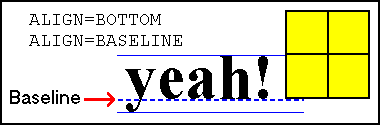 In some older browsers this meant that the image aligned with the lowest portion of the text, i.e. the low point to which the bottom of j abd y dangle. Most browsers understand
 BOTTOM to mean the baseline of the text.
ABSBOTTOMABSBOTTOM aligns the image and the absolute bottom of the text (including any dangling text like with the letters j and y).
| this code | produces this |
<IMG SRC="alignbox3.gif" ALT="align box" ALIGN=ABSBOTTOM> |
Xy
|
BASELINEBASELINE means the same thing as BOTTOM: align the image with the baseline of the text. See above for explanation of BOTTOM.
| this code | produces this |
<IMG SRC="alignbox3.gif" ALT="align box" ALIGN=BASELINE> |
Xy
|