<APPLET ...> | <APPLET HEIGHT="..."> | <APPLET VSPACE="..."> |
 |
Attribute for
<APPLET ...>ALIGNALIGN<IMG ALIGN="...">
The values for
|
| this code | produces this |
<APPLET CODE="MyApplet.class" ALIGN=LEFT HEIGHT=50 WIDTH=50> |
Come on down to our beautiful town! We'll show you a right good time and some tasty food to boot! |
<APPLET CODE="MyApplet.class" ALIGN=RIGHT HEIGHT=50 WIDTH=50> |
Come on down to our beautiful town! We'll show you a right good time and some tasty food to boot! |
Text will continue to wrap around the applet until it gets past the applet, or until you use
<BR CLEAR="...">
| this code | produces this |
<APPLET CODE="MyApplet.class" ALIGN=LEFT HEIGHT=150 WIDTH=50> <PARAM NAME=TEXT VALUE="Howdy!"> </APPLET> Come on down to our beautiful town!<BR CLEAR=ALL> We'll show you a right good time and some tasty food to boot! |
Come on down to our beautiful town! We'll show you a right good time and some tasty food to boot! |
If the text looks crowded too close to the applet, you may want to check
<APPLET HSPACE="..."><APPLET VSPACE="...">
ALIGNALIGN
| this code | produces this |
<APPLET CODE="MyApplet.class" HEIGHT=50 WIDTH=50> |
Xy |
TOP
| this code | produces this |
<APPLET CODE="MyApplet.class" ALIGN=TOP HEIGHT=50 WIDTH=50> |
Xy |
MIDDLEALIGN
| this code | produces this |
<APPLET CODE="MyApplet.class" ALIGN=MIDDLE HEIGHT=50 WIDTH=50> |
X |
BOTTOM
| this code | produces this |
<APPLET CODE="MyApplet.class" ALIGN=BOTTOM HEIGHT=75 WIDTH=75> |
Xjy |
BASELINE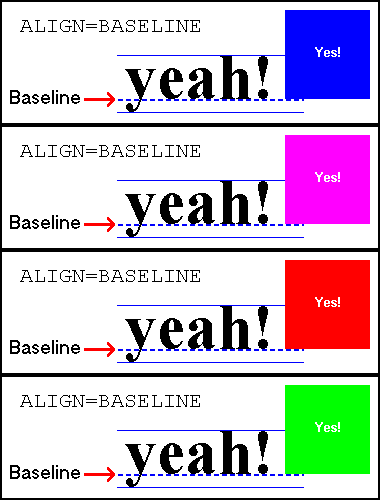 Aligns the bottom of the applet with the baseline of the text.
The baseline is the line along which the bottom of most letters rest, but
below which some letters dangle, such as j and y.
Aligns the bottom of the applet with the baseline of the text.
The baseline is the line along which the bottom of most letters rest, but
below which some letters dangle, such as j and y.
| this code | produces this |
<APPLET CODE="MyApplet.class" ALIGN=BASELINE HEIGHT=75 WIDTH=75> |
Xjy |